AI Mode in Chrome Is Google’s Strongest Bid Yet to Turn Search Into Workspace Software

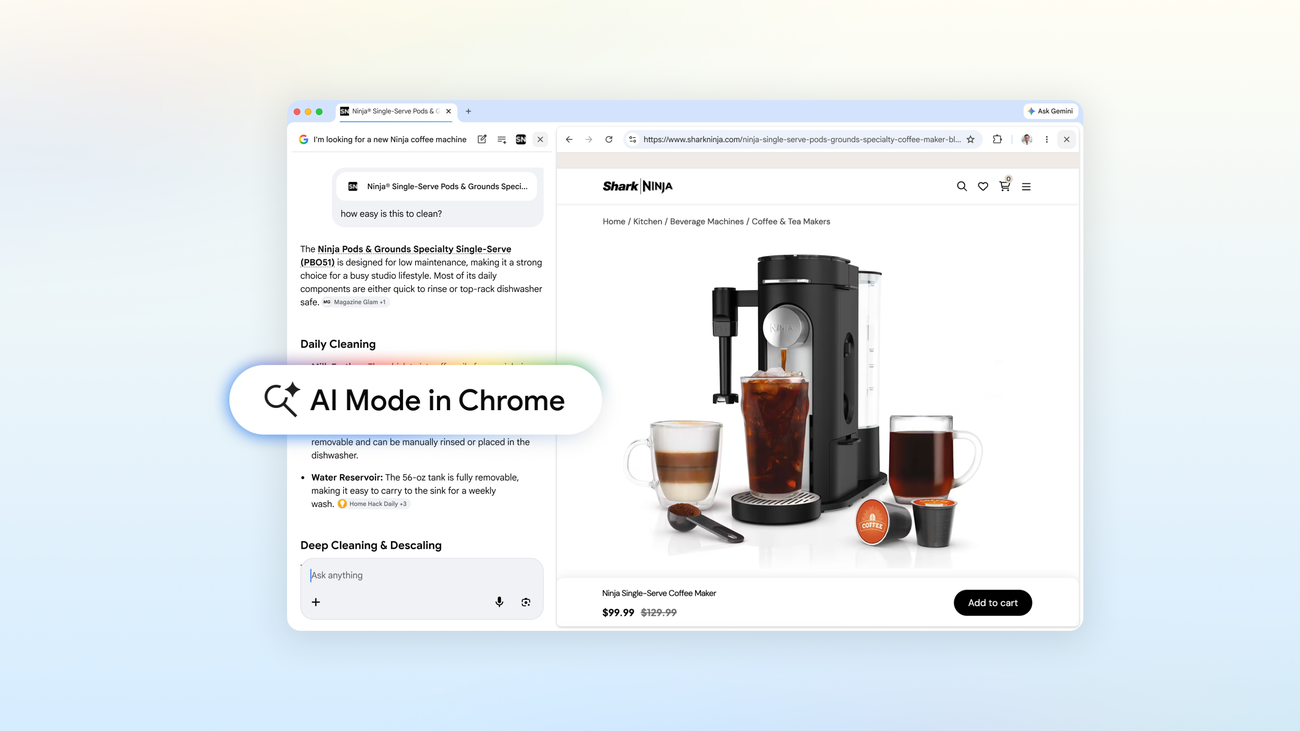
Google keeps saying it wants AI to be more helpful while people browse the web. Fair enough. What it is actually doing, more interestingly, is trying to make Chrome the place where AI work happens by default. The latest AI Mode updates in Chrome make that ambition hard to miss.
The product changes themselves are straightforward. On Chrome desktop, clicking a link in AI Mode now opens the webpage side-by-side with the AI panel, so the conversation stays live while the source page remains visible. On desktop and mobile, users can also use a new plus menu to pull recent tabs into an AI Mode query, and they can now combine multiple tabs, images, and files like PDFs in a single contextual request. Google is also surfacing tools like Canvas and image creation anywhere that plus menu appears in Chrome, and says the new experience is available now in the U.S., with broader rollout coming later.
If you only read that as a usability update, you miss the real move. This is not just Google making Search a little less clunky. It is Google trying to turn the browser into a context bus for its AI products.
That matters because Chrome already sits in the middle of modern knowledge work. Research happens there. Shopping happens there. Documentation reading, ticket triage, blog skimming, standards digging, conference procrastination disguised as “market analysis” all happen there too. When Google gives AI Mode access to the tabs you already have open, the files you are already reading, and the websites you are already comparing, it is not adding a feature around browsing. It is redefining browsing as model input.
There is a useful pattern here that product teams should not ignore: side-by-side beats context loss. One of the reasons chat-based AI often feels more annoying than magical is that it keeps asking users to leave the task to get help with the task. That is bad software ergonomics. Users hate tab hopping because tab hopping is invisible tax. Every time someone has to re-open a source, restate the question, or copy-paste snippets into a prompt window, the product is telling them it does not really understand their workflow. Google’s side-by-side layout attacks exactly that friction. The assistant sits next to the source material instead of replacing it.
That is a small UI detail with large strategic implications. Search used to be about sending you away efficiently. Increasingly, AI Search is about keeping you in a guided reading environment while still pretending to be neutral plumbing. Chrome is the perfect venue for that transition because it already has permission to hold the user’s attention for hours at a time.
For developers, the more instructive change may be the ability to search across recent tabs, images, and PDFs together. That is Google acknowledging that real-world questions almost never live inside one cleanly formatted input box. A product spec is in one tab, a competitor page is in another, the vendor’s PDF is somewhere else, and the screenshot with the one annoying bug is on your desktop. Knowledge work is fragmented by default. AI systems that cannot absorb fragmented context force users to become orchestration layers for the machine. That works for demos. It breaks down in daily use.
So here is the first practical takeaway for builders: multimodal context collection is becoming table stakes. Not because it is flashy, but because it reduces user effort. If your assistant cannot reason across the current tab, a PDF, a screenshot, and a couple of related pages without the user doing manual assembly, then your product is already behind the direction of travel. Google’s implementation may still be early, but the product thesis is sound.
The second takeaway is more subtle. AI products are moving from destination interfaces to ambient interfaces. For a while, the industry trained people to think of AI as a place you go, a chatbot tab, an app, a standalone box. That is starting to look like a temporary phase. The more durable model is AI as a layer woven into the existing workspace. Microsoft is doing this around the document suite. OpenAI wants it across apps and agents. Google is doing it in the browser, which may be the highest-leverage place of all because so much work eventually passes through it.
There is also a governance angle here that deserves more attention than it usually gets in launch posts. Traditional web search earns trust, imperfectly, by preserving source boundaries. You see the links. You choose which ones to open. You compare pages. You decide which claims feel credible. AI Mode inside Chrome changes that relationship. The model is increasingly present not only before the click but during the reading process itself. That can be genuinely useful, especially for synthesis and follow-up questions, but it also means the assistant becomes a more active mediator between the user and the source material.
That mediation is not automatically bad. It is just powerful. Powerful enough that product teams should make source visibility a first-class design constraint rather than an afterthought. If users no longer feel clear about where Google’s synthesis ends and the underlying publisher’s claims begin, the product may become more convenient and less trustworthy at the same time. Those two things can absolutely happen together.
This is where Google has a better opportunity than many of its rivals and also a harder balancing act. The opportunity is distribution. Chrome gives Google a massive installed surface for AI assistance without asking users to adopt a new tool. The balancing act is avoiding the impression that the browser is quietly becoming a soft enclosure where Google intermediates not just search discovery, but the reading, comparison, and interpretation that follow. Publishers will notice. Regulators will notice. Power users already notice.
Even so, this is one of the clearest Google AI product moves of the year because it focuses on workflow rather than spectacle. No benchmark chest-thumping, no vague claims about the future of intelligence, just a direct attack on an obvious pain point: people lose context while trying to use AI and the web at the same time. Fix that, and you change habits.
The industry should stop treating the browser as a passive container. Google clearly is not. Chrome is becoming an execution environment for AI-assisted work, one plus menu at a time. If you build developer tools, research products, enterprise assistants, or productivity software, that is the signal to watch. The next competition is not only about who has the smartest model. It is about who lives closest to the work without becoming one more thing the user has to manage.
Google is trying to make Search feel less like a results page and more like a workspace. That is a much smarter ambition than another attempt to wow everyone with a chat window.
Sources: Google Blog, Google Canvas announcement, Chrome Help, Google AI