Chrome’s New ‘Skills’ Feature Is Google Admitting Prompting Should Feel More Like Software

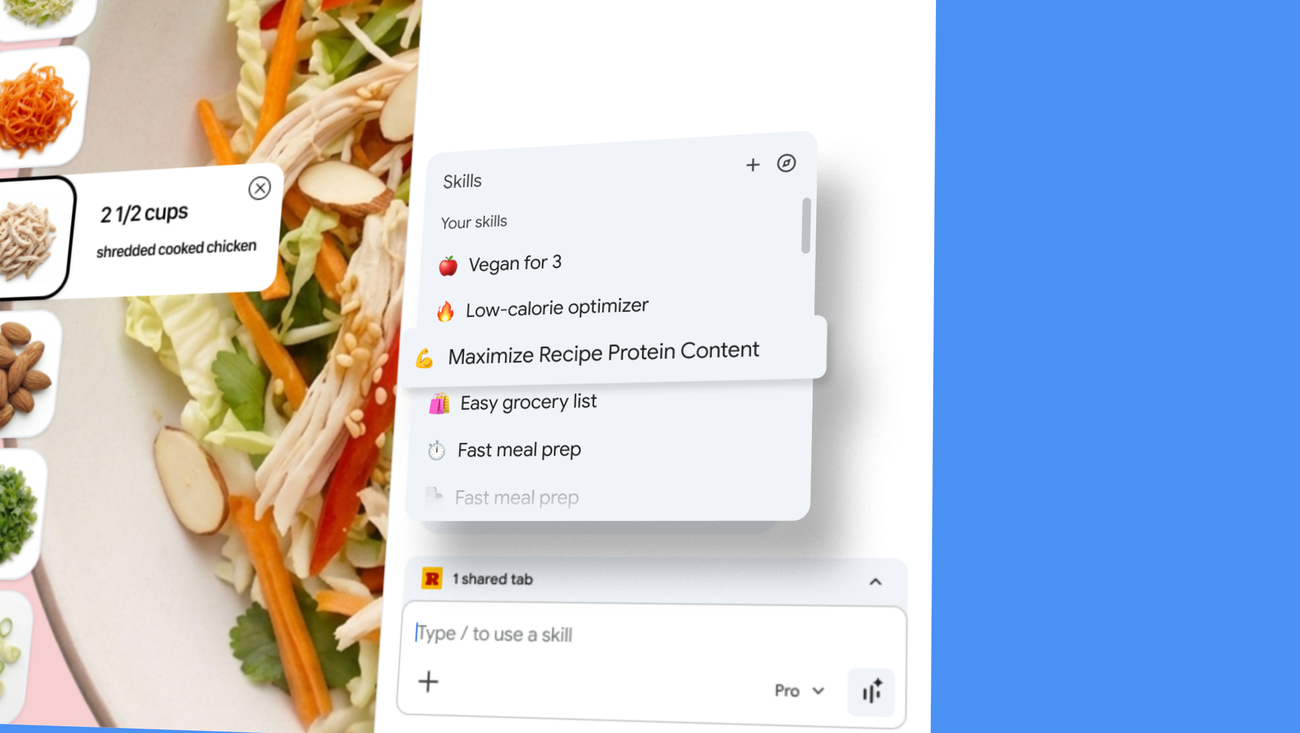
The most revealing thing about Google’s new Skills feature for Chrome is that it quietly admits the current prompting model is broken. Not broken in the sense that prompts do not work. Broken in the sense that a useful AI workflow still behaves too much like a temporary conversation and not enough like software. If a good prompt has to be rediscovered, retyped, and reattached to context every time you need it, that is not intelligence. That is user-hostile muscle-memory tax.
Google is trying to fix that with Skills in Chrome, launched April 14 for Gemini in Chrome on desktop. The product pitch is straightforward: when you write a prompt you want to reuse, you can save it from chat history, invoke it later with a forward slash or the plus button, and run it against the page you are viewing plus any other tabs you select. Google is also shipping a starter library of prewritten Skills for common tasks such as shopping comparisons, ingredient analysis, and document scanning. Saved Skills sync across signed-in Chrome desktop devices, and Google says higher-risk actions still require confirmation before anything like sending an email or adding a calendar event.
On one level, this is a small feature. On another, it is Google admitting that prompting needs packaging, reuse, and context-binding if it is going to survive as a real interface. That matters far beyond Chrome.
Prompts are turning into macros, and that is progress
The AI industry has spent an absurd amount of time romanticizing prompts as if every user wants to become a part-time spellcaster. In practice, most people who get value from AI end up with a handful of recurring tasks: compare these products, summarize this document, pull the key data from this page, rewrite this draft in a specific voice, extract risks from these terms, find contradictions across several tabs. Those are not one-off conversations. They are repeatable operations.
Skills nudges Gemini in Chrome toward that reality. A saved prompt that can be run against the current page or a set of tabs is not quite an agent, but it is much closer to a browser macro than to a chat reply. That sounds incremental, and it is, but incremental is often where product truth shows up. The difference between novelty and habit is usually not model quality alone. It is whether the useful thing can be reused without friction.
Google’s own examples give away the real use case. Compare specs across multiple shopping tabs. Scan lengthy documents for important information. Check ingredients or nutrition details across pages. These are not “talk to AI about philosophy” moments. They are workflow compressions. Chrome is becoming a place where you can bind a repeatable instruction to the web context already on your screen. That is a much better product story than “here is another sidebar where you can ask questions.”
Chrome is becoming a workflow shell, not just a browser
Google has been steadily turning Chrome into a host environment for Gemini rather than a passive window onto websites. First came tighter sidebar integration. Then more countries got Gemini in Chrome access. Now Skills adds saved, remixable workflows on top of browsing context. The through line is obvious: Google wants the browser to be where AI work happens by default, not a place where users periodically leave the page to visit a chatbot tab.
That strategy makes sense. The browser is where modern knowledge work already lives. Docs, SaaS dashboards, product pages, tickets, email, research, admin portals, and random PDFs all end up there. If Google can make Gemini useful in that environment without forcing users to switch surfaces, it has a better shot at daily retention than a standalone chat product does.
There is also a competitive angle here. OpenAI, Anthropic, and Microsoft are all converging on the same lesson: raw model access is not enough. The sticky product is a workflow layer with memory, reusable actions, and some relationship to the user’s live context. Chrome Skills is Google’s browser-native version of that shift. It is not glamorous, but it is strategically smart.
The bigger lesson for builders is that prompting should become implementation detail
This feature is useful not because saved prompts are a revolutionary idea, but because Google is productizing a principle too many AI teams still ignore. Users do not want to manage prompts. They want outcomes. A good AI product should surface the workflow, the artifact, or the shortcut, not demand repeated prompt craftsmanship from the human on the other side.
If you are building AI tooling, the actionable takeaway is brutal and simple. Stop treating prompt entry as your main user experience. Good prompts should become templates, automations, named actions, saved views, reusable recipes, or background configuration. Once a user finds something that works, your job is to make that success portable and repeatable. The more your product relies on people manually reconstructing prior success, the more churn you are quietly designing in.
Skills also hints at a second lesson: context is the real product. Running a saved workflow against the current page and selected tabs is materially more useful than saving a prompt in the abstract. A prompt without context is just text. A prompt attached to the thing the user is already looking at starts to behave like software.
That is where this gets interesting for practitioners. Developers should start thinking about AI features less as “chat over data” and more as “operations over live context.” In a browser, context means pages, tabs, selected content, session state, and whatever the user can explicitly point at. In other environments it might mean documents, repos, dashboards, tickets, or internal knowledge sources. The pattern generalizes cleanly.
There is real utility here, and real risk
Google says Skills inherits the existing safeguards used for Gemini in Chrome and still asks for confirmation on higher-risk actions. Good. It should. Any browser-integrated AI feature that can look across tabs and execute semi-structured actions deserves paranoia by default. Prompt injection risk, accidental disclosure, over-broad tab context, and false confidence remain part of the package whether the UI calls the feature a skill, workflow, or magic button.
That does not make the feature a bad idea. It just means the trust model matters as much as the convenience model. Builders copying this pattern should design for explicit scope, clear previews, confirmation for external actions, and easy editing. A saved prompt is only helpful if users feel they still control what it sees and does.
Early outside coverage from Engadget treated Skills as a small but handy upgrade, which feels right. This is not a moonshot launch. It is a competence launch. The signal is less “look at this wild new AI thing” and more “Google is learning what productizing AI actually requires.” Reuse, discoverability, and context-aware execution are more durable than another giant model adjective.
My read is that Chrome Skills is Google conceding something the rest of the industry will eventually concede too: prompting should feel less like freehand composition and more like invoking a tool. The winners in browser AI will not be the products with the most poetic system prompt. They will be the ones that turn recurring intent into reliable, low-friction software. Skills is a modest step in that direction. It is also one of the saner ones.