Codex Pets Are the Most Honest Feature the Agentic Era Has Produced

Here's what OpenAI understood about autonomous agents that most of the discourse missed: the hardest part isn't making them capable. It's making them tolerable to work alongside.
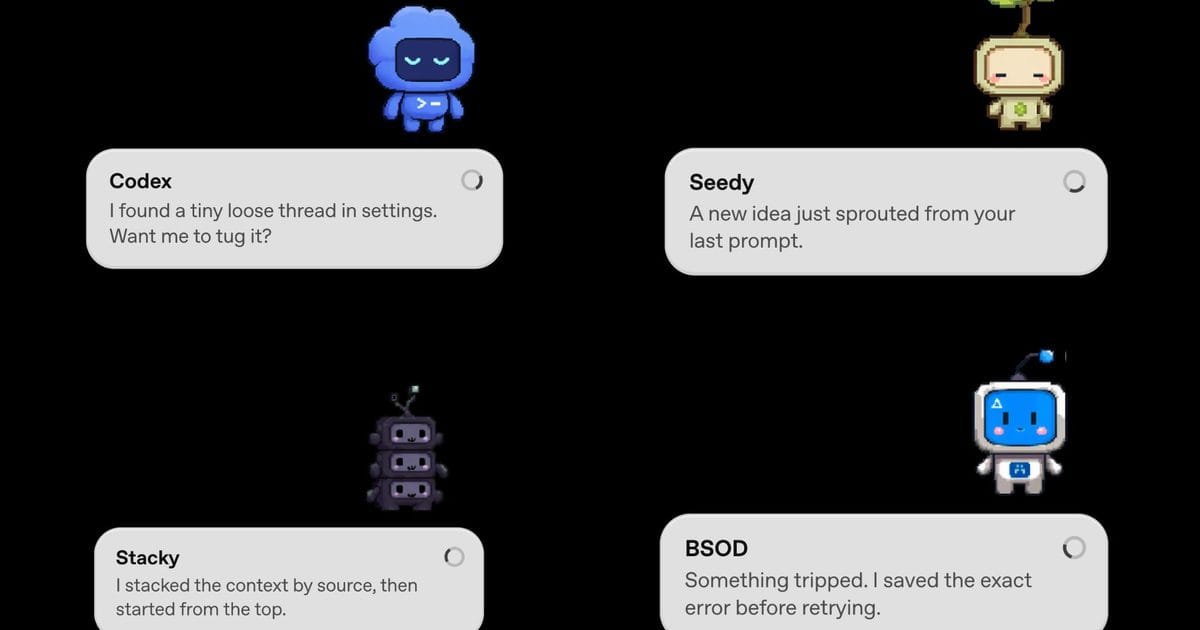
Codex Pets, shipped officially on May 4 and documented in the OpenAI Developers settings page, is a feature that looks like a gimmick until you spend a day with an autonomous coding agent and realize you were keeping its window open out of anxiety, not utility. The floating pixel-art companion that shows task state, alerts when Codex needs input, and lets you reply without switching context solves a problem that nobody named explicitly until now: ambient awareness in an agentic workflow.
The feature puts eight built-in pixel-art pets as optional overlays in the desktop app. They float while you work, showing active thread, running or waiting state, and a short progress prompt. You can click through them to send a reply while a task is running. The /hatch command generates custom pets from uploaded images using a bundled skill, which saves locally and is shareable — community sharing sites appeared within hours of launch, which is exactly the adoption pattern you'd expect from a feature with zero barrier to personalization.
On its face, this is cosmetic. But the ambient awareness problem is real, and it's been the quiet anxiety of the agentic era. Autonomous coding agents work well when you can watch them. They become anxiety-inducing when you can't. You either leave the window open and sacrifice your screen to the agent's output, or you minimize it and spend the rest of the day wondering whether it's still running, waiting for input, or hung on something that would be easy to fix if you just knew it needed fixing. The floating overlay solves exactly that: you glance at the corner of your screen, you know the state, you move on. It's the UX equivalent of a good status light on a printer versus having to walk over and check it.
The two-way interaction via click-through is the part that gets less attention than it deserves. Replying to a running task without switching windows is a lightweight interrupt mechanism — faster than context-switching, reading what's on screen, formulating a response. For workflows where you need to course-correct an agent mid-task, that friction difference compounds over a day of usage. It's not dramatic. It's just daily life with an agent, made marginally less annoying, which is a bigger product improvement than the feature's playful framing suggests.
The custom pet generator is the longer-term platform bet, and it's the one that reveals how OpenAI is thinking about this. By letting users create and share AI companions, they're crowdsourcing the persona layer of their product. Users who build and share pets are creating community attachment to a feature that costs almost nothing to serve. It's the same logic as custom emojis in Slack or skins in games — the platform provides the canvas, the users create the value, and the attachment that forms is real even if the feature itself is functionally trivial. OpenAI is running a contest for favorite custom pets with ChatGPT Pro as a prize, which is a low-cost growth mechanism dressed up as community celebration.
The timing of this launch matters more than the feature itself. Codex Pets drops the same week OpenAI first hinted at a broader platform expansion — the SSH Connections panel, the remote control hints, the iPhone companion signals. That context makes Pets read as a confidence signal: OpenAI thinks the core agent UX is stable enough to build personality on top of. You don't ship playful overlays when you're still debugging your task execution. You ship them when the base layer works and you're looking for the edges to expand.
There's also the config auto-import feature buried in the same update, which is more operationally significant than the pet generator. The ability to detect and import settings from Claude Code means Codex is acknowledging what power users already do: run multiple agents simultaneously and want configurations that travel. The agent ecosystem is quietly standardizing around portable settings, and both GitHub and OpenAI are sending the same signal — cross-vendor skills and config portability is becoming table stakes, not a differentiator.
For practitioners, the useful framing isn't "is a pixel-art companion worth my time" — it's "what does this tell me about where the product is headed." Pets is an indicator that OpenAI is moving from "make the agent work" to "make the agent pleasant to live with." Those are different engineering priorities, and the second one only becomes tractable once the first is solved. The overlay solves a real daily friction that anyone running Codex in the background already knows exists.
The feature is opt-in, which is the right call. Ambient awareness tools are personal preferences — some developers want the status indicator, others find it distracting. The /pet slash command and Settings > Appearance toggle give power users a path in, while leaving the default experience unchanged. That's a sensible default for a feature that sits at the intersection of utility and personality.
Whether Pets drives retention is an open question. The attachment mechanics are sound — sharing, customization, community — but "AI coding companion overlay" is a niche use case even within the already-niche world of autonomous coding agents. The real value of shipping this now is probably less about retention and more about signal: OpenAI is betting that the agentic UX layer is stable enough to support personality, which tells you where they think the product is in its maturity curve.
If you're running Codex in a production workflow, the overlay is worth enabling. The daily friction of not knowing whether your agent is running, waiting, or done is real, and the Pets overlay is the cheapest fix that doesn't require you to leave a window open. The two-way reply mechanism alone justifies the enable. The pixel-art aesthetic is a bonus, not the point.
Sources: Digital Trends, OpenAI Developers: Codex app settings, PCWorld