Copilot CLI GA Makes the Terminal an Agent Workbench, Not Just a Prompt Box

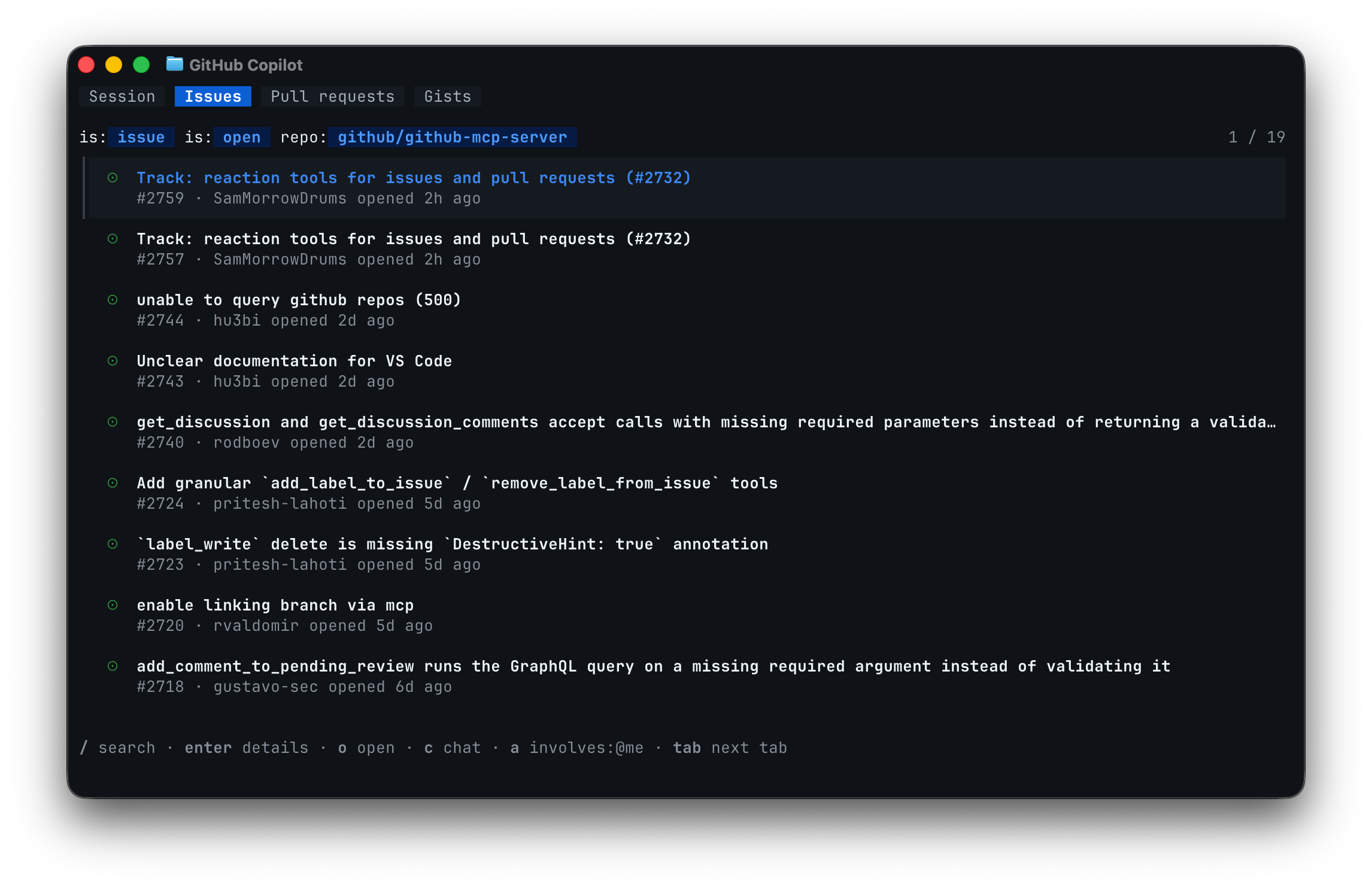
GitHub’s new Copilot CLI terminal interface is generally available, and the least interesting thing about it is that it has tabs. The interesting part is what those tabs imply: the terminal is becoming an agent workbench where GitHub context, MCP servers, skills, plugins, hooks, custom agents, approvals, and repo work all sit in one place.
That is the right direction. It is also where the blast radius gets real. Coding agents are useful because they can touch the same artifacts developers touch. Terminals are dangerous for exactly the same reason.
The terminal finally gets first-class work context
The redesigned Copilot CLI, previewed at Microsoft Build 2026 and now GA, adds a richer terminal UI with a default Session tab and global Gists tab. Inside a GitHub repository, it also shows Issues and Pull requests tabs. Developers can press c to insert an issue, PR, or gist reference into the prompt, o to open it in the browser, and / to search issues or pull requests with a GitHub query. The docs say issue and PR tabs default to open items involving the user, with an a toggle for all open items in the repo.
That sounds like UI polish until you watch how bad agent prompts usually are. “Fix this” is not a unit of work. An issue with reproduction steps, a PR with failing checks, a gist with sample input, or a linked review comment is a unit of work. Pulling those references directly into the prompt reduces the mushy copy-paste layer where humans omit the important context and agents confidently optimize the wrong thing.
It also improves auditability. If an agent investigation starts from a GitHub issue and ends in a PR, the work has a trail. That is much better than a disposable chat transcript that never makes it into project history. Teams trying to normalize AI-assisted development should care about this more than the screenshot. Agent work needs provenance, not vibes.
The public github/copilot-cli repository is a useful signal here: more than 10,800 stars, roughly 1,700 forks, and a large open issue backlog during research. That is real developer attention, and also a reminder that agent CLIs are not static SDKs. They live in shells, repos, auth environments, terminals, corporate networks, broken dotfiles, strange hooks, and developer muscle memory. The rough edges will be operational, not theoretical.
MCP makes extension easy, so policy has to get stricter
The GA interface includes in-session customization through commands such as /mcp add, /mcp search, /skills, /plugin, and /settings. GitHub says MCP servers are available immediately after installation without restarting the CLI. Copilot CLI also supports custom instructions, hooks, skills, custom agents, MCP servers, and plugins.
This is where the release stops being a nicer terminal UI and starts being an agent control plane. MCP servers can connect an agent to databases, ticketing systems, documentation, CI/CD, cloud consoles, calendars, and internal tools. Skills can change the agent’s operating procedure. Plugins can add capabilities. Hooks can run shell commands at session start, prompt submission, task completion, errors, or session end. GitHub gives “run tests after Copilot makes changes” as a reasonable example.
Good. Also: absolutely review this stuff.
An MCP server installed during a terminal session is a new tool boundary. A hook copied into a repo is automation that may execute when the human is paying attention to something else. A skill that tells the agent how to deploy, migrate, or “fix” tests can encode policy or encode chaos. Anything that changes what the agent can see or do should be treated like code. Put it in review. Version it. Keep it boring. Avoid hidden side effects. Do not let every developer’s dotfiles become an untracked agent operating system.
The security concern is not that MCP is bad. The concern is that MCP makes tool access composable, and composability without defaults becomes permission soup. Prompt injection is no longer just “the model said something weird.” It can become “the model followed malicious instructions from an issue body and invoked a tool you casually installed last week.” If the CLI can search, add, and activate tools quickly, organizations need allowlists, secret-scoping rules, logging, and a default-deny posture for sensitive systems.
Subagents are the architecture hint
Copilot CLI’s support for custom agents is especially important because GitHub says they run as subagents with their own context windows and role-appropriate toolsets. That is the right primitive. A reviewer agent should be able to inspect and comment without editing code. A documentation agent should not need deployment credentials. A database helper should not automatically inherit repo mutation rights. Good agent systems make boundaries structural instead of relying on a polite prompt that says “please don’t.”
This is where terminal agents can get substantially better than the first wave of assistant tools. A single all-powerful chat session is convenient, but it is a bad security model. Role-specific agents with constrained tools map more closely to how engineering teams already operate: reviewer, implementer, release manager, test fixer, documentation maintainer, incident investigator. Different jobs, different permissions, different logs.
The CLI also previews every action before execution and requires explicit approval, according to the repository README. That is table stakes, but table stakes matter. The terminal is where a single approved command can rewrite a repo, delete generated assets, rotate files, alter local config, or kick off deploy scripts. Approval UX needs to be boringly clear, and teams should verify it in a non-critical repo before letting the tool near production branches.
For rollout, the checklist is not complicated. Update Copilot CLI somewhere safe first. Confirm action previews and approval gates. Decide which MCP servers are approved. Put hooks, skills, plugins, and custom agents under repo or organization review. Train developers to start from issues and PRs rather than free-floating prompts. Watch premium-request consumption and AI-credit usage where applicable. Keep a rollback path obvious enough that nobody has to improvise when the agent starts doing terminal things with confidence.
The terminal is the right home for a coding agent because it is where real work already happens. GitHub made that surface more contextual and extensible. That is useful. It also means governance can no longer be something the platform team writes after adoption. Once the agent lives in the shell, approval gates and tool policy are part of the product.
Sources: GitHub Changelog, GitHub Docs, Copilot CLI customization docs, github/copilot-cli