Google’s Windows Desktop App Shows What AI Search Looks Like When It Wants to Be Your Launcher, Too

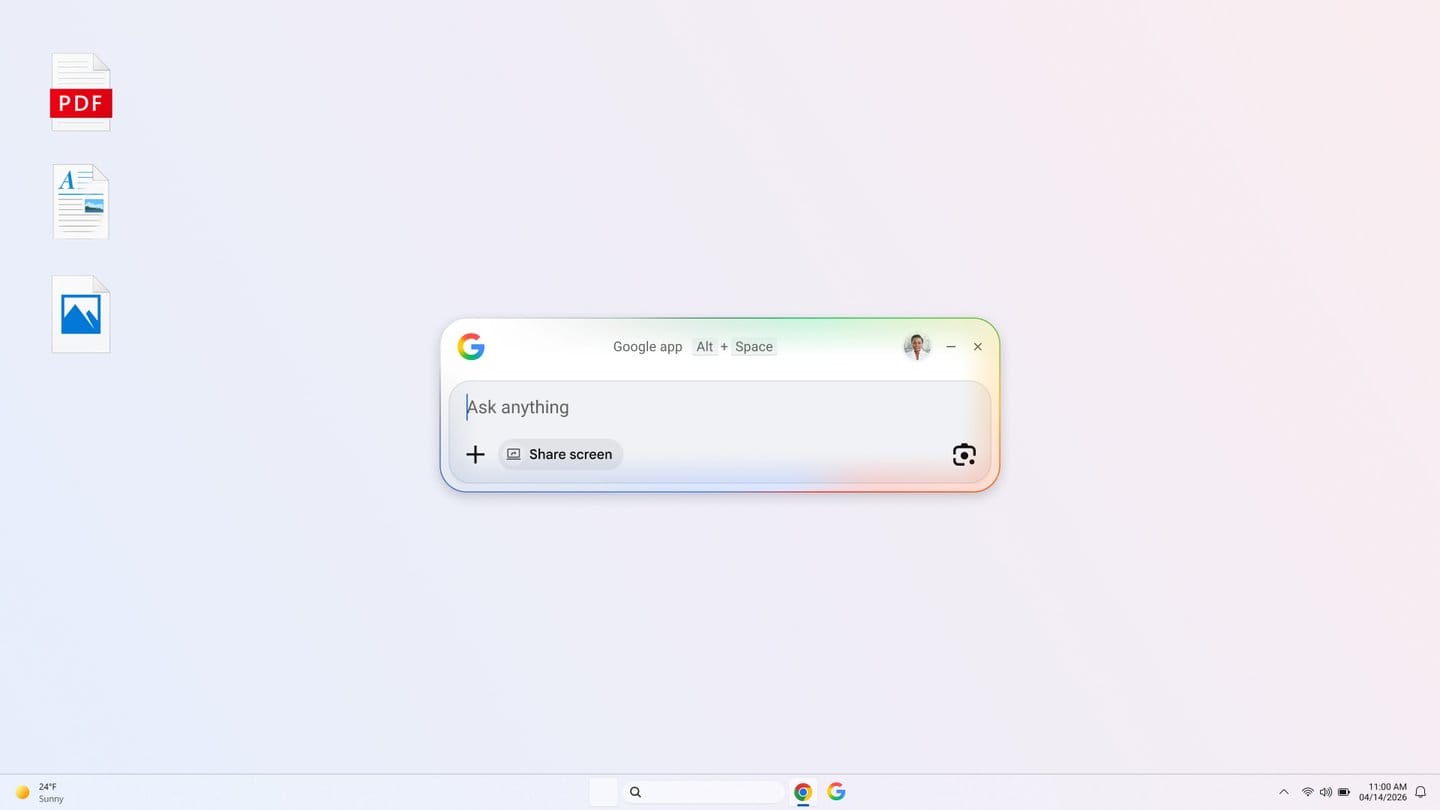
Google’s new Windows desktop app is nominally a search product, but the more useful way to read it is as an operating-system land grab. The company’s April 14 global launch puts web search, AI Mode, Google Drive results, local file search, app launching, screen sharing, and Lens behind an Alt + Space shortcut for Windows users. That does not just make Search more convenient. It pushes Google closer to the part of the workflow where default behavior gets set: the keyboard shortcut you reach for before you even decide what tool you need.
That is why this launch matters more than a routine “Google made a desktop app” headline suggests. Search inside a browser tab is one category. Search that behaves like a launcher is another. Once a product lives behind a global shortcut and can query both remote and local context, users stop thinking of it as a destination website and start treating it like infrastructure.
Google is clearly aware of the stakes. The official post says the upgraded Google app for desktop is available globally in English for Windows 10 and newer, aimed at users 13 and older. The companion support documentation adds the details that matter in practice: the app can be launched by Alt + Space, can search the web, Google Drive, local files, and installed apps, supports AI Mode for conversational answers with follow-up questions, and includes screen sharing plus Lens-based visual search. Google also says the local-file index stays on-device and is not sent to Google servers, which is not a minor detail when you are asking people to let a web company sit this close to their machine.
The shortcut is the story
Alt + Space is not just a convenience. It is an ambition statement. Every launcher, command palette, and desktop assistant lives or dies on habit formation. If you own the shortcut, you own the first query. That matters because the first query increasingly determines where the rest of the workflow goes. Do you open a browser tab? A local app? A Drive document? An AI conversation? A screenshot tool? Google is trying to answer “all of the above, from one box.”
That is a smart move, and also a dangerous one. Smart because users genuinely want universal search. Dangerous because this is a brutally unforgiving category. Windows Search exists. PowerToys Run exists. Enterprise users already have internal launchers, file tools, and browser habits. On the Mac side, Spotlight and Raycast trained people to expect near-zero friction and near-instant results. If Google’s app feels sluggish, noisy, or overeager with AI responses, the novelty window closes quickly.
Still, the product logic is sound. AI Mode on the web can be useful, but it is episodic. AI Mode inside a desktop launcher is potentially frequent. Frequency is where product power comes from. You do not need users to adore the interface. You need them to hit the shortcut five times a day without thinking about it.
Google is rebuilding Search as an ambient layer
The feature mix gives away the broader strategy. Traditional search boxes rarely combine local files, installed apps, Google Drive, screen sharing, Lens, and conversational AI. That is not just search. That is an ambient assistant trying on launcher clothing.
Screen sharing is especially revealing. Google says users can select a specific window or their entire screen and keep asking questions without breaking flow. That is a meaningful shift from “search for information” toward “reason about my active context.” Add Lens, which can translate images or text and help with what is on screen, and the app starts to look less like a desktop entry point to search and more like a lightweight cross-app assistant.
This is the right direction if you believe AI’s next interface battle is not only about answer quality but placement. The assistant closest to the work tends to get the work. Microsoft understands this. Apple is trying to understand it. Google clearly does too. The desktop app is Google’s attempt to move Search and AI Mode from a place you visit to a thing that hovers one key combo away.
There is a practical lesson here for anyone building AI products
Developers should notice that the win condition is not “add AI to desktop software.” The win condition is “remove the cost of invoking it.” That sounds trivial, but it is not. Many AI features still fail because the activation energy is too high. Open the app. Load the chat. Paste the context. Explain the problem. Wait. If the product instead meets the user at the shortcut, imports context from the current screen, and lets the next question happen immediately, usage changes.
That is the real takeaway for builders. Context capture and invocation speed matter as much as model choice. If your AI tool is theoretically powerful but operationally annoying, the better model loses to the easier surface more often than the benchmarks would like to admit. Google’s app is a reminder that the distribution fight is becoming an ergonomics fight.
There is another lesson here too: AI products are converging with old-fashioned utility software. Search, launchers, file finders, screenshot tools, translators, and quick-answer boxes used to be separate categories. AI is pulling them together. That creates opportunity, but also a design trap. When one surface tries to do too many things, it can become an indistinct blob of maybe-helpful. Product teams need ruthless prioritization if they want users to understand why the surface deserves a permanent place in muscle memory.
The trust model will decide whether this sticks
Google deserves some credit for emphasizing that local-file indexing stays on-device. That is the sort of implementation detail users increasingly care about and large companies too often bury. But trust questions are still everywhere. AI Mode is not available for all accounts, countries, and languages. Screen sharing and desktop-wide access can feel invasive even when useful. Enterprise environments may hesitate before allowing another surface that can look across windows and connect web answers to local state.
In other words, the product problem is not just capability. It is restraint. A desktop assistant has to be fast, quiet, and predictable before people let it become part of their daily loop. If Google gets that right, the app could become a meaningful foothold for AI Mode outside the browser. If it gets it wrong, it becomes another well-funded utility users install once and forget by Friday.
Outside coverage from 9to5Google called the experience “Spotlight-like,” which is accurate and probably intentional. The comparison is flattering, but it also sets the bar. Spotlight works because it feels immediate. Raycast works because it feels programmable and precise. Google’s twist is that the same box can reason over the screen, the web, Drive, and local files. That is compelling, provided it does not collapse under its own ambition.
My take: this launch is less about Windows and more about where Search wants to live next. Google is trying to turn AI search into an always-near utility, something closer to a launcher than a homepage. That is a stronger strategic move than another incremental web update, because the assistant that wins your shortcut eventually has a shot at winning your workflow too.
Sources: Google, Google Search Help, Google app for desktop, 9to5Google