Azure MCP in Visual Studio Is Microsoft Turning Agent Tooling into a Checkbox, Which Is Exactly the Point

Standards do not win when everyone agrees they are elegant. They win when they become annoying to avoid. That is why Microsoft’s newest Azure MCP move matters more than it first appears. The company has now baked Azure MCP tools directly into the Azure development workload for Visual Studio 2022, removing the separate extension install that previously made the whole thing feel optional, experimental, and slightly easier to ignore.
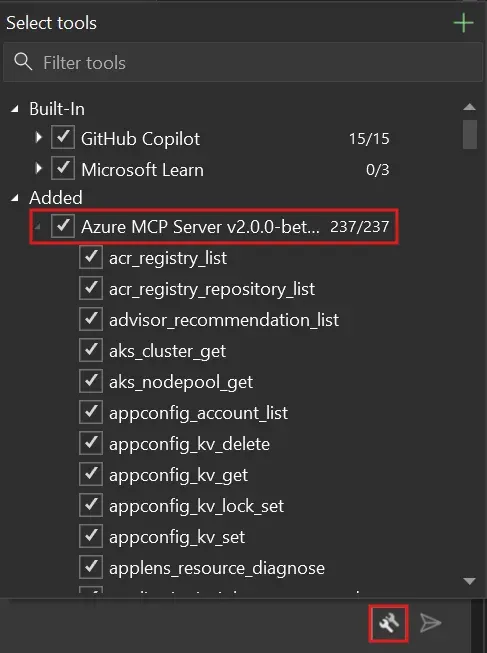
The headline change is simple. Starting with Visual Studio 2022 version 17.14.30, Azure MCP tools ship in the box, though they remain disabled by default. Once enabled inside GitHub Copilot Chat, developers get access to more than 230 tools across 45 Azure services. Microsoft’s own examples span resource discovery, App Service deployment, AppLens diagnostics, and Log Analytics queries. That is not a toy integration. That is Microsoft wiring a pretty large slice of Azure operations directly into the day-to-day IDE surface where developers already ask Copilot for help.
If this sounds incremental, good. Incremental is how infrastructure actually spreads. Microsoft previously required developers to install the “GitHub Copilot for Azure” extension, manage VSIX updates, restart Visual Studio, and occasionally fight installer weirdness. Those steps were not technically hard, but they were enough friction to keep MCP in the category of “interesting thing we should try sometime.” Shipping the Azure MCP Server as part of the normal Visual Studio workload changes that psychology. Now the path is: update Visual Studio, turn on the server, keep working.
That matters because MCP has reached the stage where its future depends less on protocol evangelism and more on default distribution. Microsoft Learn already positions Azure MCP Server as compatible with MCP clients such as GitHub Copilot agent mode, the OpenAI Agents SDK, and Semantic Kernel. The same documentation emphasizes Entra ID authentication through the Azure Identity library and RBAC-governed access rather than API-key sprawl. Put those pieces together and the picture gets clearer: Microsoft is not just adding an IDE convenience feature, it is trying to normalize a single Azure-aware tool boundary across coding agents, enterprise assistants, and cloud workflows.
From optional extension to default plumbing
That shift has real consequences for adoption. In enterprise environments, the difference between “install this separate extension” and “it ships in the standard workload” is bigger than product teams like to admit. The first looks like a pilot. The second looks like sanctioned infrastructure. It is easier for teams to standardize, easier for IT to support, and easier for platform leads to document as the default path. When Microsoft says the Azure MCP Server will now update through the normal Visual Studio release cycle, it is really saying version management is no longer your problem. That is the kind of sentence corporate developers like hearing.
The broader Azure MCP documentation reinforces the same pattern. Microsoft lists support across Visual Studio Code, Visual Studio, Eclipse, Cursor, Windsurf, IntelliJ, and Cline. That editor spread matters because it hints at a bigger strategy than one IDE feature. Microsoft wants Azure operations through MCP to feel portable across local tooling, coding agents, and custom intelligent apps. If it succeeds, developers will start thinking of Azure access not as a pile of product-specific integrations, but as a stable tool surface that can show up anywhere an MCP client can run.
That is good platform design. It also happens to be a smart lock-in strategy, though not in the cartoonishly evil sense people often mean by that word. The best platform lock-in is not hard captivity. It is habit formation. Once teams get used to asking Copilot to list resources, troubleshoot an App Service, or query logs through the same MCP-shaped interface inside the IDE, the Azure control plane becomes more ambient. It stops being a separate browser tab and becomes part of the development loop.
The real question is not convenience. It is power.
The obvious risk is that convenience can outpace governance. “Over 230 tools across 45 Azure services” is an impressive capability statement. It is also a reminder that agent-mediated cloud operations can widen the blast radius of a casual prompt if permissions, defaults, and auditability are sloppy. Microsoft is at least pointing in the right direction. The tools are disabled by default. They require both an Azure account and a GitHub Copilot subscription. And, crucially, Microsoft says tool availability respects existing Azure subscription permissions, meaning MCP does not bypass RBAC just because the request arrived through chat instead of the portal.
Still, that is the minimum bar, not the whole answer. Teams adopting this should review who can enable which tools, whether shared repository MCP configuration files are being committed thoughtfully, and how much action autonomy they are comfortable granting inside chat-first workflows. Convenience features become governance incidents faster than product marketing copy ever suggests.
There is also a subtler engineering lesson here. For the past year, a lot of AI tooling has been sold as if the assistant itself were the product. In reality, the assistant is often just the interface. The durable asset is the tool layer underneath it: the permissions model, the structured actions, the diagnostics surface, the way cloud operations become callable rather than manually clicked. Azure MCP in Visual Studio is a quiet example of that truth. Microsoft is not really shipping “more Copilot.” It is shipping more structured access to Azure, using Copilot as the user-facing shell.
For practitioners, the next step is practical. If your team builds on Azure and already pays for GitHub Copilot, test the in-box MCP workflow on safe read-heavy tasks first: inventory, diagnostics, log queries, resource explanation, deployment planning. Validate that RBAC behaves exactly as expected. Then decide whether you want to expand into higher-risk write actions. If you manage a developer platform, document which MCP tools are approved and which should stay off by default. And if you are building your own internal agent experiences, pay attention to the architectural pattern here. A well-governed MCP layer may matter more than whichever model you route the prompts through this quarter.
Microsoft’s sharpest move is not the feature itself. It is the distribution decision. By pushing Azure MCP into the ordinary Visual Studio installer path, Microsoft is trying to make MCP-based cloud operations feel normal. That is how standards stop being conference-slide material and start becoming reality.
Sources: Microsoft DevBlogs, Microsoft Learn, Visual Studio setup docs, Azure MCP tools overview