Azure’s SRE Agent Is Microsoft’s Strongest Argument Yet for Letting AI Touch Production, Carefully

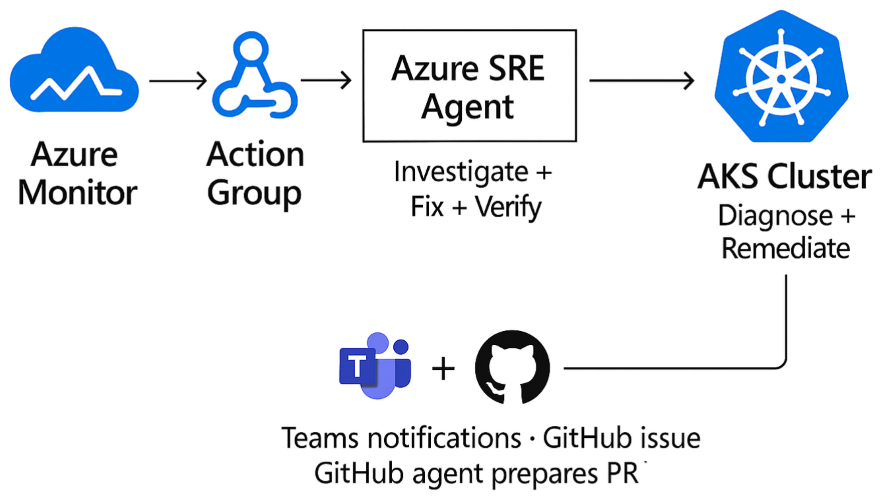
Most AI operations demos still cheat. They show a model naming the problem, maybe suggesting a fix, and then they quietly hand control back to a human before anything expensive, dangerous, or reputation-damaging happens. Microsoft’s new Azure SRE Agent demo is interesting precisely because it tries to cross that line without pretending the line disappeared. The story is not that AI can now fix Kubernetes. The story is that Microsoft is finally describing an operational framework for where autonomous remediation can be allowed, how narrow the permissions should be, and what evidence should be collected before the agent touches production.
That is a much more serious conversation than the usual agent theater.
In Microsoft’s Apps on Azure walkthrough, Azure SRE Agent handled two AKS incidents end to end. The environment was concrete enough to matter: an AKS cluster with node auto-provisioning, Azure CNI Overlay with Cilium, managed Prometheus metrics, and the AKS Store microservices sample app. One incident was a startup failure caused by laughably low CPU settings on makeline-service, with a request of 1m, a limit of 5m, a memory request of 6Mi, and a memory limit of 20Mi. The second was a CrashLoopBackOff tied to OOMKilled, where the pod’s 20Mi memory limit sat 12.8x below the workload’s observed 50Mi baseline.
Those details matter because they make the demo legible to operators. This was not “the agent noticed performance degradation and optimized the system.” It was a bounded troubleshooting loop working through telemetry, exit codes, probe failures, restart counts, and resource settings.
This is less about AI magic than about operational posture
Microsoft’s strongest idea in the post is not the agent itself. It is the rollout ladder: start with Reader + Review, then move to Privileged + Review, and only then consider Privileged + Autonomous for narrow, trusted paths. That is the first Azure AI story in a while that sounds like it was reviewed by someone who has actually been on call.
The company is also explicit about something the broader AI tooling market keeps trying to dodge: prompt quality is not the main safety mechanism. RBAC, scope, telemetry quality, action gating, and tool boundaries are. That sounds obvious to infrastructure teams, but it is still not how many agent products are marketed. Too much of the industry still behaves as if a carefully worded system prompt can substitute for least privilege. It cannot. A model with bad permissions is still dangerous, even if it says “I will proceed carefully.”
Azure SRE Agent’s demo works because the control plane is clearer than the copy. Incidents come in through Azure Monitor. The agent uses Azure-native signals and diagnostics. Teams and GitHub are connectors, not the core source of truth. Permissions define what the agent can change. Run mode defines whether it asks or acts. That separation is the real product story.
The technical signal is that Microsoft wants AI ops to look boring
Consider the first incident. The agent did not jump to the fashionable answer. It differentiated CPU starvation from memory pressure by reading the pod state, startup probe behavior, and the fact that the process exited with code 1 rather than 137. It then found three more CPU-throttled pods running at 112 to 200 percent of configured limit, patched four workloads, and verified that the cluster returned to zero restarts. Microsoft reports about eight minutes from alert to recovery with zero human interventions.
The second incident followed the same pattern, just with different evidence. Empty logs plus exit code 137 pointed to a process that died before it could emit useful output. The agent raised the memory limit from 20Mi to 128Mi and the request from 10Mi to 50Mi, then verified the pod stabilized at 74Mi out of 128Mi, roughly 58 percent utilization, again with zero restarts.
That consistency is important. Production reliability work is usually repetitive, and that is exactly why it is a decent fit for automation. The dream is not a creative AI SRE that improvises heroically. The useful thing is a governed loop that investigates, applies narrow remediations, verifies recovery, and leaves behind an audit trail.
Microsoft also includes a concrete PromQL pattern for catching crash loops using kube_pod_container_status_waiting_reason combined with restart counters. That is a small but revealing choice. The best agent products will not just automate response. They will improve the shape of the observability and alerting system around them. Otherwise you just get a fast agent fed by bad signals.
The GitHub follow-up may be the most important part
The runtime patch is only half the fix. If the cluster recovers but the source manifests remain wrong, the next deploy reintroduces the same bug and the whole exercise becomes operational whack-a-mole. Microsoft’s workflow pushes the post-incident summary into GitHub and can hand it off to a GitHub Copilot agent for a draft pull request. That bridge from live-site mitigation to durable source correction is the part more vendors should be copying.
Practitioners should pay attention here. The valuable pattern is not “AI fixed production.” It is “AI handled the first-response mechanics, then created a reviewable engineering artifact so humans can ratify the durable fix.” That is the right balance of autonomy and accountability. It also tells you where the market is going. The winners in enterprise agent ops will not just integrate with dashboards. They will integrate with the systems of record that own code, policy, and incident history.
This creates an interesting competitive angle for Azure. Microsoft is steadily assembling a stack where observability, cloud control, incident intake, collaboration, and code follow-up all live within a single operational neighborhood. The more coherent that loop becomes, the less compelling it is to stitch together a dozen separate tools around a generic model endpoint. Azure’s moat here is not model intelligence alone. It is workflow gravity.
What teams should actually do with this
If you run AKS or any Kubernetes platform, the takeaway is not to hand production to an agent next week. The takeaway is to identify one or two failure modes that are both common and tightly bounded, then see whether your telemetry and permissions model are good enough to automate them. CPU starvation on startup probes, obvious OOM misconfigurations, image pull failures, and narrow restart-loop cases are reasonable starting points. “Anything suspicious in the cluster” is not.
Second, treat review mode as the real pilot, not as training wheels. If the agent cannot produce a convincing investigation and a narrowly scoped remediation plan under review, it has not earned autonomy. Third, measure more than mean time to resolution. Measure false positives, patch reversions, misdiagnoses, and how often humans disagree with the agent’s root-cause framing. A fast wrong answer is still an incident.
Finally, remember the economics. Microsoft cites industry reports that place manual Sev1 MTTR in the 30 to 120 minute range for Kubernetes environments. If a governed agent can reliably shrink a subset of those incidents into single-digit minutes, that is real value. But the financial upside only materializes if teams also trust the blast radius controls. Nobody saves money by replacing toil with automated chaos.
My read is simple. Azure SRE Agent is not interesting because it proves AI can touch production. We already knew that was technically possible. It is interesting because Microsoft is starting to define the guardrails that make such automation defensible: narrow scope, explicit permission levels, trusted alert sources, verification after remediation, and a code-level handoff for permanent fixes. That is the kind of boring rigor enterprise AI needs more of.
If Microsoft keeps this grounded, Azure could end up with something more durable than another agent demo. It could have a credible operating model for when AI should be allowed to act, and when it should stay in review.
Sources: Microsoft Tech Community, Microsoft Learn, GitHub demo repository