Copilot Notebooks Just Moved From Premium Feature to Shared Team Context Layer

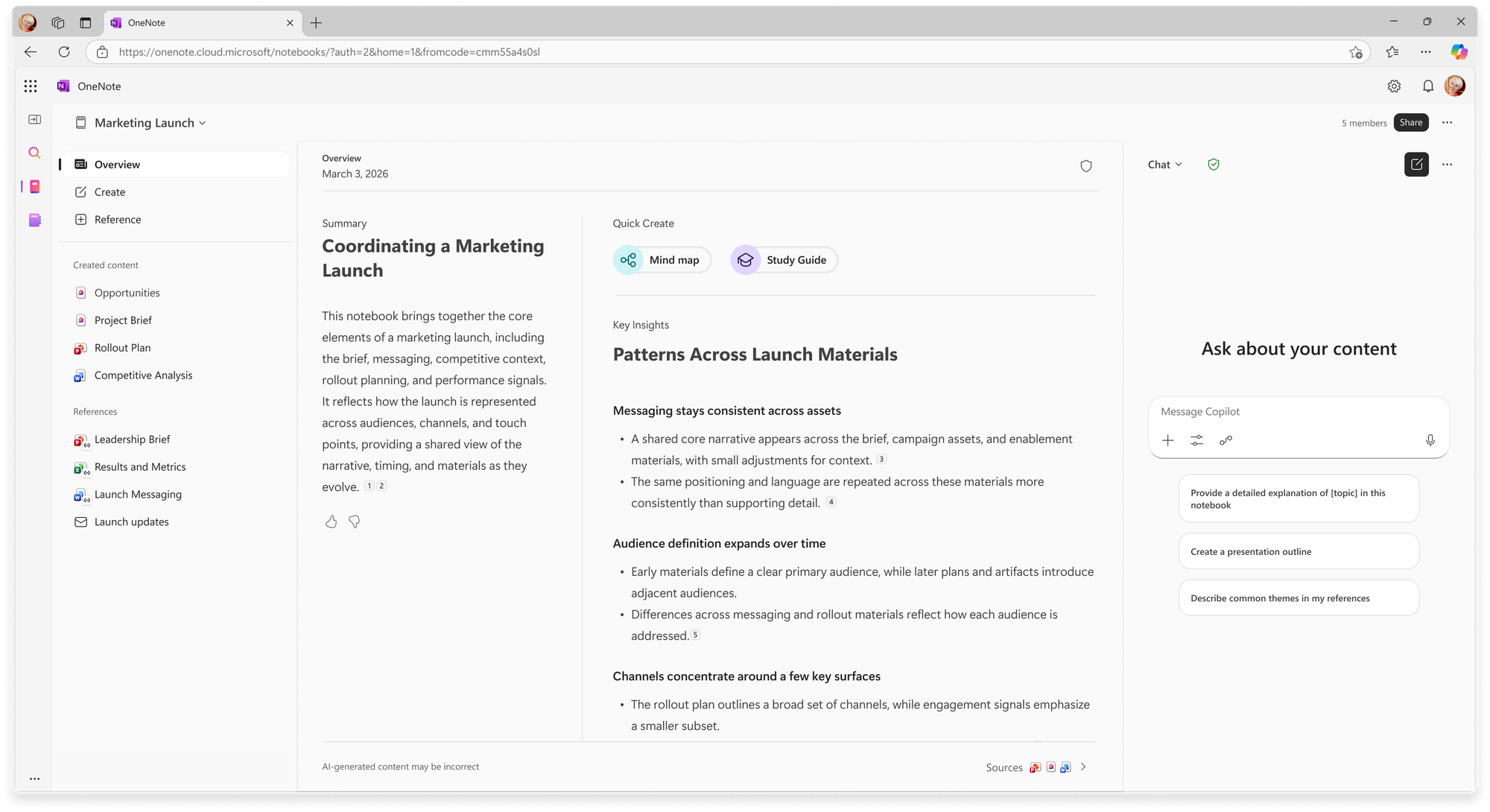
Copilot Notebooks looks, at first glance, like one more Microsoft 365 surface where users can dump files and ask an AI to summarize them. That framing undersells the move. The useful story is that Microsoft is taking the most annoying part of workplace AI — getting the right context into the session, keeping it current, and making it shareable without turning permissions into confetti — and turning it into a durable product primitive.
That matters because blank chat boxes are a bad interface for real work. A project has decks, docs, spreadsheets, meeting notes, email threads, links, prior chats, and half-remembered decisions scattered across Microsoft 365. If every Copilot session starts with the user rebuilding that context by hand, the assistant is not a coworker. It is a very expensive autocomplete field with amnesia.
Microsoft’s June Notebooks update moves the feature beyond paid Microsoft 365 Copilot users and into Copilot Chat commercial and education audiences. In the Microsoft 365 Copilot app and OneNote, users can collect Word documents, PowerPoint presentations, Excel worksheets, Outlook emails, Copilot chats, files, pages, meeting notes, links, and sites into a notebook, then ask Copilot questions grounded in that material. Copilot Chat Basic commercial users get a narrower version for now — Notebooks in OneNote on the web — but the direction is clear enough: Notebooks is becoming a shared AI workspace, not a premium side quest.
The context layer is the product
The mixed-license collaboration detail is the quiet product decision worth watching. Teams with different Copilot entitlements can work in the same notebook. Copilot Chat users get standard sources and standard chat access; Microsoft 365 Copilot users can add premium sources and use premium AI capabilities such as advanced creation experiences. That is a much better boundary than splitting organizations into “AI people” and “everyone else.”
Shared context only becomes useful when the whole team can stand around it. If the notebook becomes the project memory — the place where the relevant documents, meetings, links, and evolving materials live — then limiting basic access to premium seats would just create another knowledge silo with a Copilot logo on it. Microsoft appears to understand that the container has to be broadly reachable, while the higher-value operations on that container can still be monetized.
The support docs reinforce the intended mental model: Notebooks is an AI workspace whose references update dynamically as a project evolves. That is more consequential than a one-shot upload. A static file dump helps with a question. A living, permissioned collection can become the working memory for a project, course, customer account, incident review, product launch, or legal matter.
There is a trap here, though: persistent context is not automatically good context. If teams shovel stale decks, duplicate docs, meeting notes with unresolved decisions, and links to abandoned plans into a notebook, Copilot will faithfully ground itself in organizational entropy. The better implementation pattern is boring and editorial: name notebooks clearly, assign an owner, curate references, remove obsolete material, and make the notebook reflect the current state of the work rather than every artifact the team has ever touched.
Admins inherit the “AI workspace” whether they asked for it or not
The operational details matter more than the announcement copy. Message Center coverage for MC1384425 says notebook content is stored in user-owned SharePoint Embedded containers shared with Microsoft Loop. It appears as “Loop” in the SharePoint admin center, PowerShell, and Purview; it counts toward SharePoint storage quota; it respects existing Copilot Notebooks and Loop admin configuration; and it is enabled by default where Copilot Notebooks is allowed.
That is the right architecture, and also the part IT teams need to read twice. Notebooks are not ephemeral prompt windows living outside the tenant model. They sit in the Microsoft 365 governance universe: SharePoint storage, Purview visibility, admin policy, lifecycle, discovery, and permission inheritance. This is exactly what enterprise AI should do. It is also how a small user-facing feature becomes a support surface.
Practitioners should treat rollout as an information-architecture project, not a chatbot enablement project. Before encouraging teams to build notebooks for everything, test how sharing behaves across mixed-license groups. Create notebooks with documents at different permission levels and verify what each user can reference, see, and ask about. Check Purview discovery. Confirm storage growth and naming behavior in admin tools. Decide whether Loop and Notebooks policies are already aligned with how the organization expects AI workspaces to behave.
The permissions test is especially important because “grounded in your work data” is only reassuring if the grounding respects actual access boundaries. A notebook that makes permission mistakes would be worse than a generic chat session because users will trust it more. Microsoft’s integration with the existing SharePoint and Loop model is a strong starting point, but admins should verify with their own tenant, their own policies, and their own messy mix of internal, external, and sensitive content.
Study Guide is Microsoft’s education wedge
The education companion update makes the strategy more obvious. Copilot Notebooks are coming to Microsoft 365 Education A1, A3, and A5 users, with education tenants expected to see availability over the next two weeks and OneNote availability after that. Study Guide is generally available for education and enterprise users, rolling out from June 11, and supports education users ages 13 and up; for K-12 users aged 13 to 17, Microsoft requires the correct Microsoft Entra ID age group plus an admin-enabled Copilot Chat setting.
Study Guide is not just “summarize this PDF.” Microsoft lists summary pages, topic pages, flashcards, fill-in-the-blanks, matching activities, and Microsoft Forms-powered quizzes. It supports 21 languages at launch, including English, Arabic, Chinese Simplified and Traditional, French, German, Hebrew, Italian, Japanese, Korean, Portuguese Brazil, Spanish Mexico, Spanish Spain, Swedish, Ukrainian, and Vietnamese. Microsoft also says summary and topic pages include citations back to original materials, pages are private by default, stored in the learner’s Microsoft 365 notebook, editable or deletable by the learner, and prompts and outputs are not used to train AI models.
That citation claim is the whole game. AI study tools without citations are homework-shaped hallucination machines. AI study tools with usable citations can become practice environments: generate flashcards from the assigned material, quiz against the actual lecture notes, and trace weak answers back to the source. Teachers and students still need to verify the outputs, but verification becomes practical when the assistant brings receipts.
There is also a product-learning loop here. Education is a perfect pressure test for durable context. Students work across lectures, readings, slides, notes, assignments, and feedback. They revisit material over weeks. They need practice, not just answers. If Notebooks can handle that workflow without making a mess of privacy, permissions, citations, and storage, the same pattern maps cleanly to enterprise onboarding, customer enablement, support playbooks, compliance training, and internal knowledge bases.
What teams should do before the rollout becomes muscle memory
The practical move is not to ban Notebooks until every policy is perfect. That never happens. The practical move is to define a small set of expected patterns before users invent worse ones.
Start with naming and ownership. A notebook called “Q3 launch — current source of truth” is useful. A notebook called “AI stuff” will become landfill. Decide who curates the references and when stale material gets removed. For project notebooks, add only the documents users should actually reason from, not every adjacent artifact in the folder.
Second, separate sensitive workflows. Legal, HR, finance, customer escalations, and regulated education data deserve narrower sharing defaults and explicit review. Notebooks may respect permissions, but permission hygiene is usually the weakest link. Persistent AI context makes bad sharing decisions more durable.
Third, teach users the difference between grounded and guaranteed. Grounding improves relevance. Citations improve auditability. Neither turns Copilot into an authority. The correct user behavior is still: ask, inspect citations, compare against source material, and treat generated outputs as drafts unless verified.
Finally, watch the broader Microsoft pattern. Copilot Notebooks is the human-facing context layer. Fabric IQ and Work IQ are the data and business context layers. Foundry and Agent 365 are the runtime and governance layers for agents. The strategic throughline is obvious: Microsoft wants enterprise AI to run where enterprise context already lives, with permissions, storage, audit, and workflow attached.
That is a strong bet. It is also a bet that makes governance inseparable from usability. If Notebooks gives teams a reliable, shared, permissioned working memory, it will matter more than another model picker entry. If it becomes another place where stale content accumulates and users blindly trust fluent summaries, it will become SharePoint sprawl with better prose.
My read: Notebooks is one of those Microsoft features that looks small because it is not glamorous. But durable context is the missing middle between chat demos and useful workplace AI. The companies that get this right will not win because their assistant can summarize one document. They will win because the assistant knows which documents matter, can explain why, and stays inside the boundaries the organization can actually defend.
Sources: Microsoft TechCommunity, Microsoft Education Blog, Microsoft Support, Microsoft 365 Message Center archive