Microsoft’s Fara1.5 Says Browser Agents Need Smaller Models, Not Bigger Demos

Browser agents are where impressive demos go to meet the boring parts of production: login walls, popups, stale pages, payment buttons, missing user preferences, and the thousand tiny ways a web workflow can fail after the launch video ends. Microsoft Research’s new Fara1.5 release is interesting because it does not pretend those problems disappear if the model gets bigger. It ships a family of browser computer-use agents — 4B, 9B, and 27B parameters — and the real message is architectural: the browser agent that survives in production probably looks less like one omniscient frontier model with a cursor and more like a small, sandboxed worker with logs, approvals, and a narrow job.
That sounds less glamorous than “AI uses your computer for you.” Good. Glamour is not the missing ingredient in this category.
Fara1.5 is Microsoft’s follow-up to Fara-7B, its earlier small computer-use agent model. The new family is built on Qwen3.5 base checkpoints and trained for browser tasks through an observe-think-act loop. At each step, the model receives the conversation history plus the three most recent browser screenshots, then emits its reasoning and one next action. Those actions include standard mouse and keyboard inputs, web search, context-management moves like remembering facts, and asking the user for clarification.
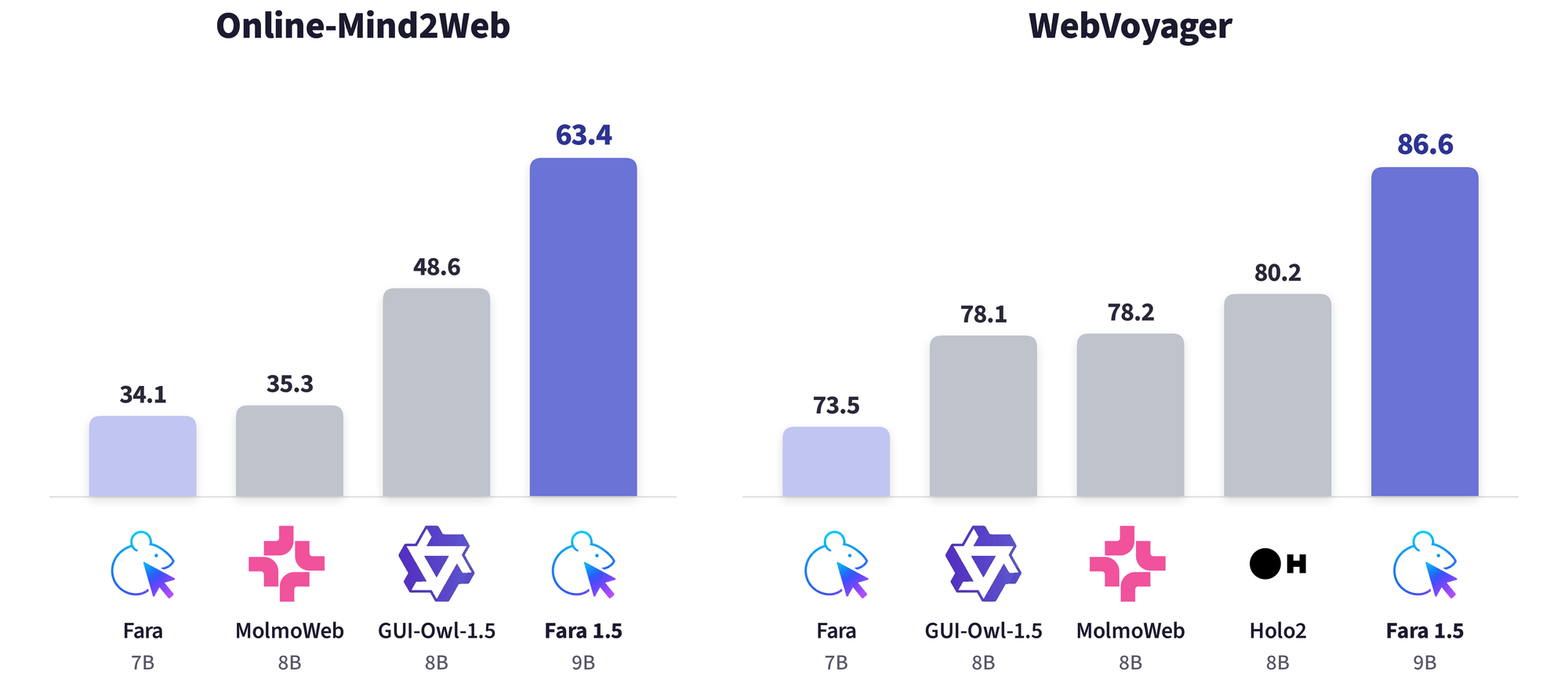
The benchmark numbers are strong enough to be worth paying attention to. On Online-Mind2Web, a benchmark covering 300 tasks across 136 popular sites, Microsoft reports task-success rates of 57.3% for Fara1.5-4B, 63.4% for Fara1.5-9B, and 72.0% for Fara1.5-27B. The 9B model nearly doubles the earlier Fara-7B result of 34.1% and beats GUI-Owl-1.5-8B’s 48.6%. The 27B model also clears several proprietary systems on the same automated evaluation: OpenAI Operator at 58.3%, Google Gemini 2.5 Computer Use at 57.3%, and Yutori Navigator n1 at 64.7%.
On WebVoyager, Microsoft reports 80.8% for the 4B model, 86.6% for 9B, and 88.6% for 27B. Scaling from 4B to 27B buys 14.7 points on Online-Mind2Web and 7.8 points on WebVoyager. That is not a subtle gain, but the 9B result may be the more important product signal. If a 9B browser worker can do a useful share of the job, teams can start thinking in terms of routing, escalation, and cost tiers instead of sending every click to the largest model they can afford.
The 9B model is the deployment story
Most computer-use agent coverage still treats the category as a leaderboard race between large systems. That is understandable, but incomplete. The thing that will make browser agents viable inside companies is not only peak task success; it is whether the system can be deployed repeatedly, audited cheaply, and constrained tightly enough that a failure is a bug report rather than a breach.
This is where Fara1.5’s family design matters. A 4B model is plausible for edge or low-cost workloads. A 9B model is plausible as a default worker for constrained web tasks. A 27B model is plausible when quality matters more than cost. That gives architects a shape they already understand from software systems: fast path, slow path, escalation path. Use the small model for bounded browsing, extraction, and repetitive form work. Escalate confusing or high-risk states to a stronger model or a human. Keep the model that can click “submit” inside a sandbox where every action is visible after the fact.
That is a better mental model than “agent as employee.” Browser agents should be treated like automation components with probabilistic control logic. They need permissions, retry limits, logs, circuit breakers, and approval gates. The fact that the model can read pixels and move a mouse does not make it a colleague. It makes it a very flexible RPA bot with language skills and new failure modes.
Microsoft appears to understand that. Fara1.5 integrates with MagenticLite, a sandboxed browser interface where actions can be logged and audited. The models are also trained to stop and ask the user at three critical points: when required personal information is missing, when the task is ambiguous, or when an irreversible action would be taken without prior approval. That is the kind of safety behavior that sounds obvious until you inspect real agent demos and notice how often “approval” is bolted on as UI chrome rather than treated as core model behavior.
Synthetic clones are the part teams should steal
The strongest engineering idea in the release is not the parameter count. It is FaraGen1.5, Microsoft’s synthetic-data pipeline for training browser agents on workflows that would be unsafe or impractical to learn against the live web.
Open-internet tasks are straightforward enough: find information, compare products, navigate public pages, fill harmless forms. The harder and more valuable workflows live behind accounts: email, calendar, internal tools, marketplaces, ML experiment trackers, scheduling systems. Those are exactly where an agent becomes useful — and exactly where letting a training system mutate real accounts would be reckless.
Microsoft’s answer is to build synthetic domains. The team describes creating functional replicas of realistic apps with frontends, APIs, databases, persona-based seed data, and known correct outcomes. For state-changing tasks, an LLM judge can compare database snapshots before and after execution to verify whether the intended mutation happened and whether anything else changed. For non-mutating tasks, trajectories are scored against reference answers. The pipeline uses environments, solvers, and verifiers, with trajectory quality checked for correctness, efficiency, and user interaction.
This is the pattern practitioners should copy before they copy the model. If you want a browser agent to operate in your company’s support console, billing system, recruiting stack, or deployment dashboard, do not start by pointing it at production and “watching carefully.” Clone the workflow. Seed it with realistic fake data. Define success and forbidden side effects. Run the agent until its failures become boring. Then decide whether the remaining risk belongs behind a human approval gate or outside the agent’s scope entirely.
The old RPA lesson still applies: automation fails at the seams. The new LLM-agent version is that the seams are semantic, visual, and stateful. The button moved. The modal text changed. The user did not specify which account. The agent found two plausible matches. The confirmation page looks similar to the review page. If your evaluation does not include those seams, your benchmark is measuring the happy path with extra steps.
Benchmarks are useful; production evals are mandatory
Online-Mind2Web and WebVoyager are useful signals, and Fara1.5’s results are not hand-wavy. Microsoft says Fara1.5 numbers are averaged over three independent runs, and the evaluations use Browserbase to stabilize sessions and reduce session-level blocking. That is the right direction. Browser automation is notoriously sensitive to session state, anti-bot systems, website drift, geography, cookies, and small UI changes that never show up in a static benchmark table.
Still, public benchmark success should be treated as a reason to test, not a reason to deploy. A browser agent that succeeds on 72% of benchmark tasks can still be unacceptable for your workflow if the remaining 28% includes deleting records, emailing the wrong person, exposing customer data, or looping until it burns through budget. The more practical internal metric is narrower: can the agent complete your top 50 repetitive workflows, recover from your common UI failures, ask for help at the right moments, and leave an audit trail a reviewer can understand in under a minute?
The audit-trail requirement is not decorative. If an agent changes state, a human needs to know what it observed, what it inferred, what it clicked, what data it entered, and where it paused. “The model said it was done” is not an operational record. It is a shrug with a timestamp.
There is also a cost architecture hiding here. If browser agents become useful, they will run in swarms: one agent checking invoices, another reconciling vendor data, another preparing reports, another comparing options across internal and external systems. Routing all of that to a maximum-size frontier model is how prototypes become line items nobody wants to own. A smaller agent family gives teams a more plausible deployment model: cheap workers for low-risk repetition, larger models for difficult states, and humans for irreversible or ambiguous decisions.
That does not make Fara1.5 production-ready for every team. It does make the release more important than another “agent browses the web” demo. Microsoft is pushing the category toward the parts that actually matter: model size choices, synthetic gated-domain training, explicit critical-point handling, sandboxed execution, and auditable action logs.
The forward-looking take: browser agents will not win by becoming more magical. They will win by becoming more inspectable. Fara1.5 is a reminder that the useful agent is not the one that clicks fastest. It is the one that knows when not to click, can explain what it did, and is cheap enough to use on work that was never going to justify a frontier model babysitter. That is less cinematic. It is also how software gets shipped.
Sources: Microsoft Research, Microsoft Fara-7B background, MarkTechPost