Visual Studio’s Plan Agent Makes Think Before Editing a Product Feature

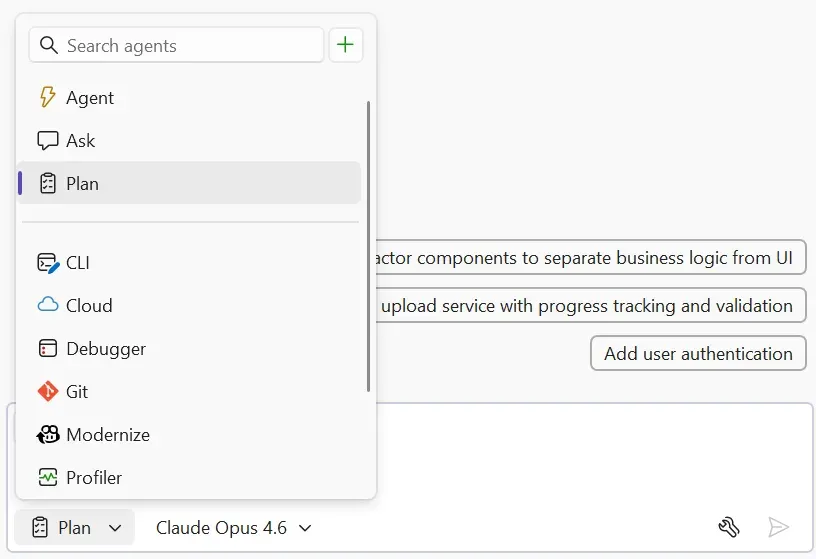
Visual Studio’s new Plan agent is Microsoft productizing a sentence every experienced engineer has said to an overeager junior: slow down, write the plan first. That may sound modest compared with agents that promise to fix whole repos while you make coffee. It is also much closer to how reliable engineering work actually happens.
The feature, now in public preview for Visual Studio 2022 17.14, lets Copilot Agent Mode create and maintain a visible markdown plan for larger tasks. The plan captures the requested work, research steps, execution progress, and updates as Copilot moves through the codebase. In other words, Microsoft is turning “think before editing” from advice into an IDE workflow.
Good. Coding agents do not mostly fail because they cannot type. They fail because they start typing too soon.
A markdown file beats a mystery diff
Microsoft says Planning in Chat is rolling out gradually and can be enabled under Tools > Options > Copilot > Enable Planning when it is not already on. It runs inside Copilot Agent Mode, where Copilot can decide whether a prompt deserves a direct answer or a coordinated plan. Small questions should still get small answers. Multi-step tasks can trigger planning.
When planning starts, Visual Studio creates a markdown file defining the task, research steps, and progress. The file lives under %TEMP%\VisualStudio\copilot-vs\ unless the developer moves it into the repo for reuse. Progress is tracked directly in the plan, so the developer can see what Copilot believes is complete and what comes next.
That file choice matters. A plan stored as markdown is humble, portable, and inspectable. It can be copied into an issue, committed as an implementation note, diffed in review, or thrown away if it was only useful during the session. It avoids the worst agent UX pattern: important state trapped inside a side panel with no audit trail and no version history. Text is boring. Text wins.
The limitation is equally important. Microsoft notes that if a user edits the plan while a response is running, the changes may not take effect immediately; the recommended workflow is to stop the response, update the file or prompt, and restart. That is workable for a preview, but it is the seam to watch. Plans are only valuable if they are steerable. If the agent writes a bad assumption into step two, the developer should be able to interrupt cheaply before the repo turns into a crime scene.
The benchmark claim is plausible, not settled
Microsoft frames the feature as drawing from hierarchical and closed-loop planning research: plan at a high level, execute step by step, adapt as context changes. It also reports internal SWE-bench runs where GPT-5 and Claude Sonnet 4 performed better with planning: roughly 15% higher success and 20% more tasks resolved.
That number is worth paying attention to. It is not worth worshiping. SWE-bench is useful, but internal benchmark deltas do not tell us the task mix, latency cost, token overhead, failure modes, or whether the same improvement appears in a 15-year-old enterprise solution with generated code, private package feeds, custom MSBuild targets, and three layers of “do not touch this” comments. Planning probably helps. Independent replication will tell us how much.
The claim does match what practitioners see in real use. Models perform better when they are forced to externalize intent, list assumptions, inspect the repo before editing, and revisit progress. They perform worse when a developer throws a sprawling task into chat and hopes the model improvises its way through a long context window. The surprising part is not that planning helps. The surprising part is how long agent products treated explicit planning like an advanced feature instead of table stakes.
This is where Visual Studio can matter again
Visual Studio does not get the same AI-tooling glamour as VS Code, Cursor, or terminal agents, but it sits inside a huge amount of serious software work. Large .NET solutions, desktop apps, enterprise backends, internal tools, old migrations, plugin-heavy setups, and debugging-heavy workflows still live there. These are exactly the codebases where “just edit the obvious file” is often wrong.
A Plan agent is a better fit for that environment than a chat-only assistant. Before changing a solution, an agent may need to inspect project references, understand build configurations, check test projects, look at Git history, reason about API compatibility, and avoid touching generated or designer-managed files. A visible plan gives the developer a chance to catch the bad path early: wrong project, wrong abstraction layer, missing validation, unsafe migration order, or tests that do not exercise the change.
This also aligns Visual Studio with a broader trend. OpenAI Codex has Goal mode, where the user defines persistent completion criteria for longer-running work across app, IDE, and CLI surfaces. Copilot has Agent Mode and cloud-agent workflows. Claude Code and other terminal agents increasingly rely on plans, todos, and explicit checkpoints. The names differ. The pattern is converging: serious coding agents need an artifact that says what they are trying to do, how they intend to do it, and how humans can interrupt.
The best version of this is not an agent that writes a plan and then ignores it. It is an agent that treats the plan as a contract under review. For a risky change, Copilot should be able to produce the plan, stop, and wait for approval. The plan should include validation steps before implementation begins. If new information invalidates the plan, the agent should update it visibly rather than quietly changing course. That is not ceremony. That is basic engineering hygiene.
How teams should use it
The practical guidance is straightforward. Use Planning for work that crosses files, projects, tests, migrations, architecture boundaries, or debugging hypotheses. Do not use it for one-line edits or simple explanations; ceremony has a cost, and forcing every small prompt into a process will train developers to ignore the process.
For production-sensitive work, require the plan to include validation before edits start: which tests will run, which project will build, which edge cases matter, and what “done” means. If Copilot cannot describe how it will validate the change, it is not ready to change the code. For legacy systems, ask it to explicitly list files it will avoid and assumptions it needs checked. That single prompt can prevent a lot of confident vandalism.
Teams should also decide when plans become durable artifacts. A throwaway refactor plan can stay in temp. A migration plan, security fix, release-risk change, or cross-team implementation should move into the repo, issue tracker, or pull request. If the plan influenced the diff, reviewers should be able to see it. A mystery diff from an agent is harder to review than a human diff because the reviewer has to reconstruct intent. A plan lowers that cost.
There is a governance angle too. A plan file is evidence. It can show what context the agent considered, what steps it intended, which validations it promised, and where it drifted. It does not replace tests, human review, or code ownership. It makes those controls easier to apply because the agent’s intent is no longer buried in transient chat state.
No public Hacker News discussion surfaced for the exact announcement during the research window, which is fine. Planning features rarely go viral. Their value shows up in quieter metrics: fewer botched multi-file edits, fewer review comments that say “why did it touch this?”, fewer abandoned agent runs, and more developers willing to use AI on tasks larger than autocomplete.
The editorial take is simple: the best coding agents are starting to look less like autocomplete and more like junior engineers forced to write down their plan before touching the repo. That is not an insult. It is the shape of trustworthy automation. Visual Studio’s Plan agent is not flashy, but it points in the right direction: agent work should be inspectable before it is executable.
Sources: Microsoft DevBlogs, Microsoft Learn, Microsoft DevBlogs on Agent Skills